A MindSphere S&F queue is a storage mechanism for a MindSphere S&F profile, used to store data that can not be sent to the MindSphere.
A MindSphere S&F queue is created when data from a
trigger action needs to be stored. Additional data from
trigger actions will be stored until the MindSphere
connection can be re-established.
When the MindSphere connection is re-established, the data
in the S&F queue is sent through to MindSphere.
MindSphere S&F Queue Management tab
The MindSphere S&F Queue Management tab provides a
list of all the S&F queues. S&F queues that were
created but have forwarded all data will remain in the
table. If no queues are displayed in the table, then no
data has been stored.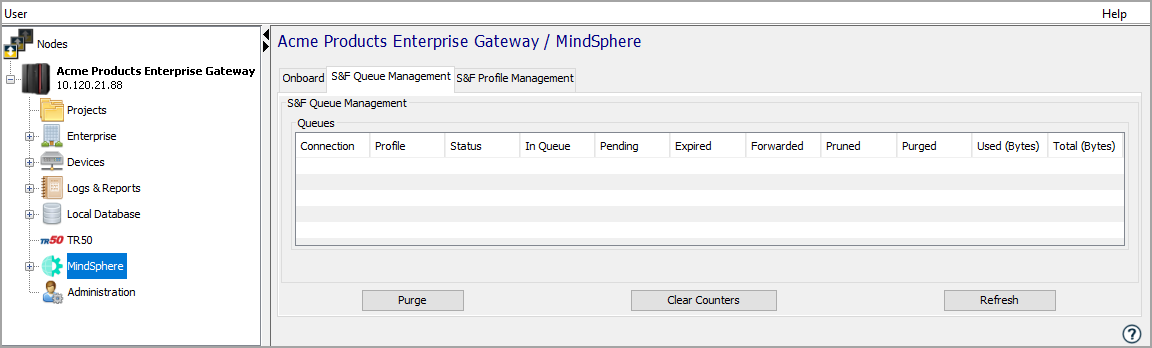
MindSphere S&F Queue Parameters
| Parameter | Description |
|---|---|
| Connection | The MindSphere connection that is using the S&F queue. |
| Profile | The S&F profile settings used by the S&F queue. |
| Status |
The current S&F Status. MindSphere S&F queues will store data when the S&F Status is Standby, Ready to store, Ready to store - forced, Storing, Storing - forced, or Forwarding. |
| In Queue | The number of messages currently in the S&F queue. |
| Pending | The number of messages currently being sent to MindSphere. |
| Expired | The number of messages expired by the TTL parameter of the associated S&F profile. |
| Forwarded | The number of messages sent to MindSphere that were in the S&F queue. |
| Pruned | The number of messages removed by pruning. |
| Purged | The number of messages purged. |
| Used (Bytes) | The current size of data in the S&F queue. |
| Total (Bytes) | The total size allowed in the S&F queue. |
Purge
Purging is an unrecoverable action that removes all data that is not pending within the S&F queue.
While purging is in progress, no new items are allowed
to enter the S&F queue.
Button descriptions
|
Button |
Description |
|---|---|
|
Purge |
See above description. |
| Clear Counters | Resets the Expired, Forwarded, Pruned and Purged counters. |
|
Refresh |
Used to refresh all values on the tab. |