As you define your devices, you can verify that the configuration of the device is correct and that the communication path to the device is working in several ways.
- When defining a new device or editing an existing device definition, the Validate function verifies that the parameter values for the device are valid and performs a communication connection to the physical device.
- After using Validate, use the Save function to save the current device definition.
- Select Devices in the left pane to
view the devices defined for this node.
The devices that are defined in this node will be listed in the Devices window.
The State column shows the current state of the device: Stopped when first defined and Started after a successful start of the device. There are other states that a device can have: Starting, Stopping and Disabled when the device is transitioning between the Started and Stopped states or when recovering from a communication problem.
The following example shows a Bosch Rexroth CS351
controller device defined in the node. The device is in
the Started state. 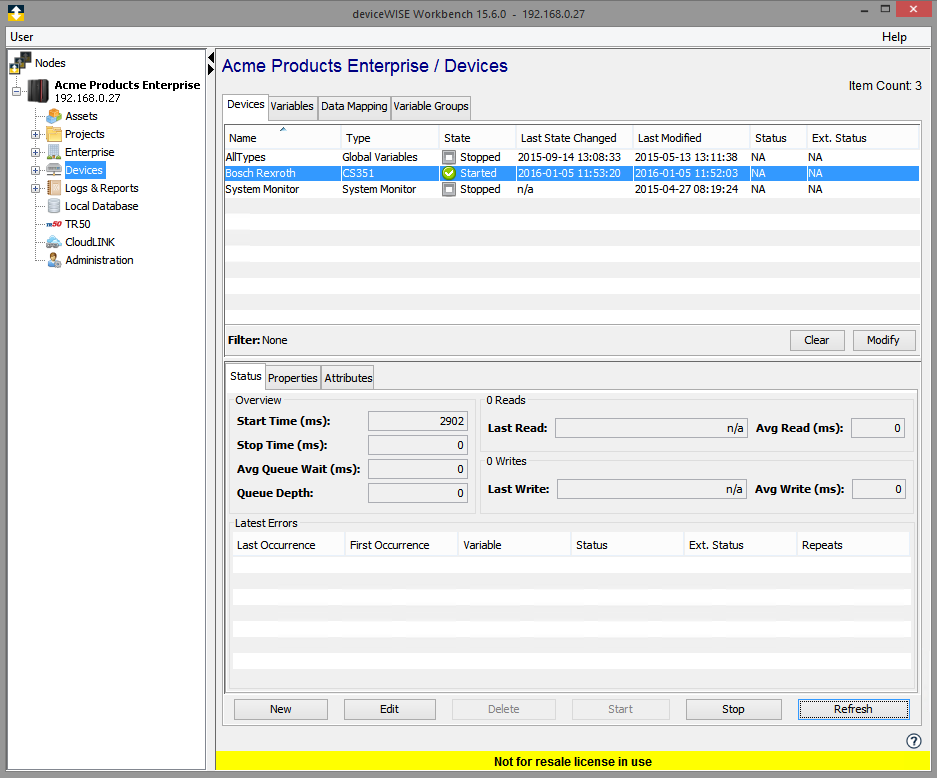
The Start button can be used to change the
state of a device from Stopped to Started.
When a device is started, the Bosch Rexroth driver:
- Establishes a communication connection to the physical device
- Subscribes with the Bosch Rexroth controller to be
notified for the following events
- Changes to the VIN
- A Parameter Set is selected
- A tightening is performed. This results in the receipt of either a MID0061 message for single spindle controllers or a MID0101 message for multi spindle controllers.
- A change is made to one of the four Identifier and Result Parts variables defined on the Bosch Rexroth controller
- Sets up the internal structures to keep track of the device connection
- Places the device in the Started state, which allows the device to be accessed (read and write), by your applications.