The Set Batch Size action sets the
batch size associated with a specific parameter set at run
time. This is performed by sending a MID0019 command to the
Stanley Tools controller.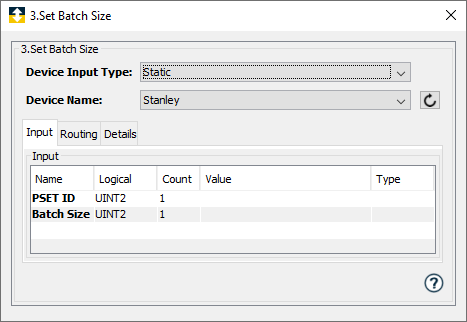
Parameters
| Parameter | Description |
|---|---|
| Device Input Type | The method to supply the device name
to the action. The options are:
|
| Device Name | Select a Stanley Tools device.
Displayed when the Static option is selected in the Device Input Type parameter. This list will contain both Stanley devices and Stanley NutRunner type devices. |
Input tab
| Parameter | Description |
|---|---|
| Device Name | Displayed when
the Dynamic option is
selected in
the Device Input
Type parameter. This variable will hold the name of the device where the set batch size command will be sent. |
| PSET ID | The PSET ID that will contain the new batch size. |
| Batch Size | The batch size to set in the parameter set indicated by the PSET ID parameter. |