After you have defined your devices, use the Workbench to access the variables that reside in those devices.
- From the Workbench left pane, click Variables
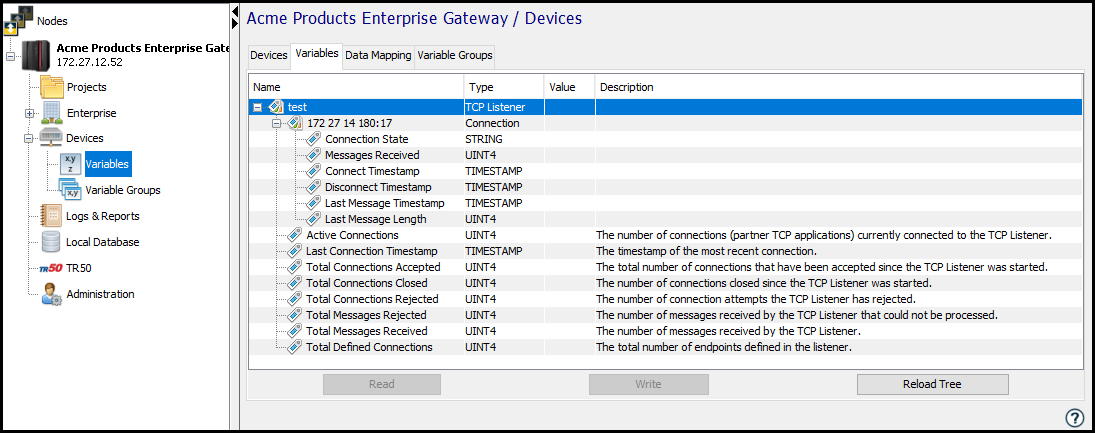
The Variables window appears as the right pane. The Variables window provides a tree format that lists the started devices in the node. The devices must be in the Started state to be included in the Variables window. Each device is expanded to show the variables that reside in that device.
The following figure shows the variables for an active type and passive type devices. The distinct active and passive variables are marked in the figure.
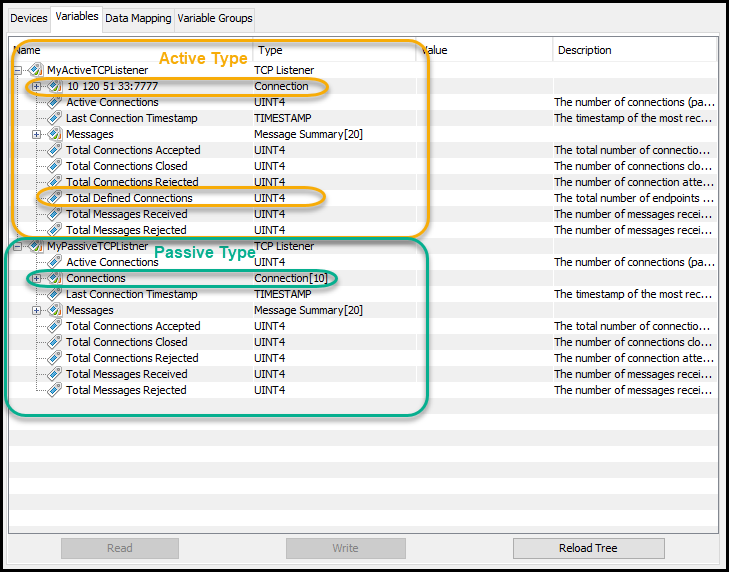
TCP Listener device type variables display connection and total messages related information.
| TCP Listener device variables | Description |
|---|---|
| Active Connections | The number of connections (partner TCP applications) currently connected to the TCP Listener device. |
| Last Connection Timestamp | The timestamp of the most recent connection. |
| Total Connections Accepted | The total number of connections that have been accepted since the TCP Listener device was started. |
| Total Connections Closed | The total number of connections that have been accepted since the TCP Listener device was started. |
| Total Connections Rejected | The total number of connections attempts that the TCP Listener device has rejected. |
| Total Messages Rejected | The total number of messages received by the TCP Listener device that could not be processed. |
| Total Messages Received | The total number of messages received by the TCP Listener device since it was started. |
| Total Defined Connections | When the Listener Type = Active, the total number of endpoints configured using the Device List parameter. |
| Messages |
Array to hold the last 20 messages received with the following members (for both Listener Type = Active and Listener Type = Active type): Timestamp : Message received timestamp Sender IP: The IP address of the device that sent the message. Message Length: The length of the message Data: Message content (array of 50 UNIT1 elements) |
If the TCP Listener device Listener Type = Active and has a configured Device List, the following variables will be displayed per endpoint:
| Active Listener device connection variables | Description |
|---|---|
| Connection State | String representation of the last known connection state. |
| Messages Received | Total number of messages received. |
| Connect Timestamp | Timestamp when the connection was made. |
| Disconnect Timestamp | Timestamp when the connection was dropped. |
| Last Message Timestamp | Timestamp of the most recent message received. |
| Last Message Length | Length of the most recent message received. |
If the TCP Listener device Listener Type = Passive, the following variables will be displayed as an array of connection data upto Maximum Concurrent Connections device value:
| Passive Listener device connection variables | Description |
|---|---|
| IP Address | String representation of the last known connection state. |
| Messages Received | Total number of messages received. |
| Connect Timestamp | Timestamp when the connection was made. |
| Last Message Timestamp | Timestamp when the connection was dropped. |
| Last Message Lenght | Timestamp of the most recent message received. |
| Messages |
Array of last 10 Messages received with the following members: Timestamp: Message received timestamp Message Length: The length of the message |