Every trigger identifies the trigger event type, which identifies when the trigger will be executed.
The trigger event types are described in the Trigger event type reference. In addition to the standard trigger event types, the USB Barcode Scanner driver makes available additional trigger event type that is used in conjunction with the USB Barcode Scanner driver trigger action to retrieve individual records from the data files.
The USB Barcode Scanner category is available in the Trigger Event Type list when defining or editing a trigger. This example shows a new trigger being defined with the Canvas Editor:
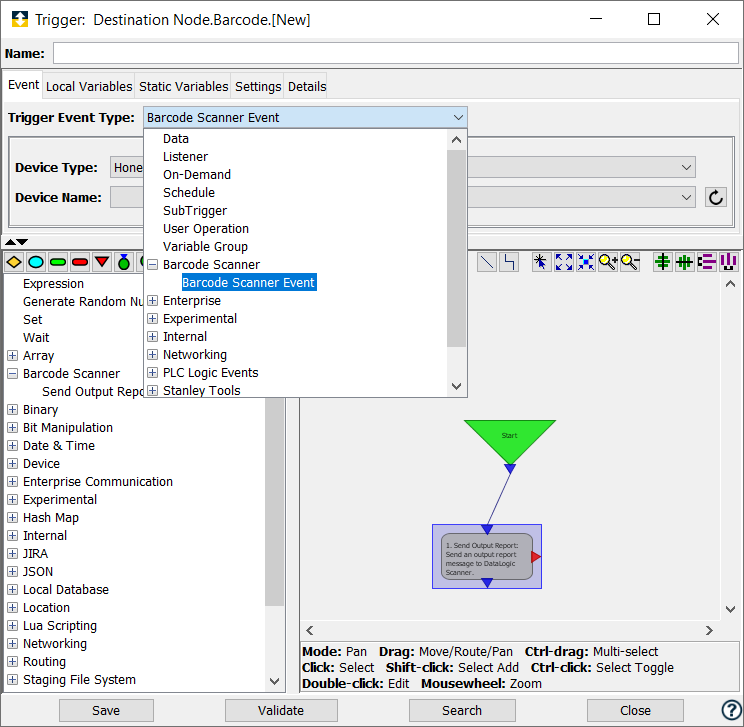
When you select the Barcode Scanner Event, the Event tab becomes active with parameters that accommodate the USB Barcode Scanner Event Message.
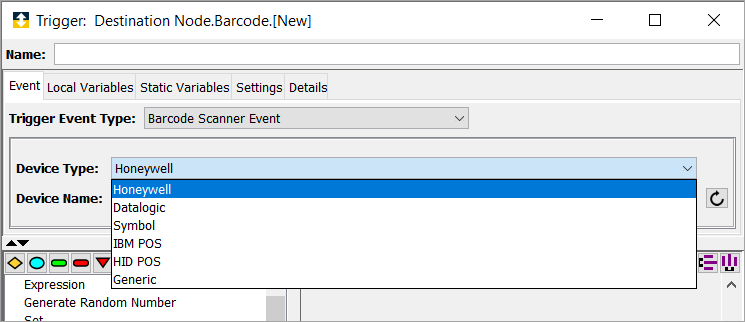
| Parameter | Description |
|---|---|
| Device Type | Select a device type. The trigger is fired when a result is received from a selected device. |
| Device Name | Select a scanner device. The options in the device name is filtered by the Device Type selected. |
| Event Input Variables | Type | Description |
|---|---|---|
| IBM POS / Datalogic / Symbol | ||
| Barcode | String | The barcode value sent from the scanner. |
| Barcode Length | UINT4 | The length of the Barcode string. |
| Status 1 | UINT1 | Reserved for Status message. |
| Status 2 | UINT1 | Reserved for Status message. |
| Status 3 | UINT1 | Reserved for Status message. |
| Type | UINT2 | A code that identifies the Symbology of the barcode. |
| Type String | String | The name of the Symbology of the barcode. |
| Honeywell / HID POS | ||
| Barcode | String | The barcode value sent from the scanner. |
| Barcode Length | UINT4 | The length of the Barcode string. |
| AIM Code | UINT1 | The flag character in the AIM Code. |
| AIM Modifier | UINT1 | The Modifier character in the AIM Code. |
| Symbology Identifier Manufacture | UINT1 | The character that identifies the Symbology associated with the scanned value. |
| Generic | ||
| Data | Binary | The raw packet delivered by the scanner. |
| Data Length | UINT4 | The length of the packet delivered by the scanner. |