The Variables tab provides the ability to Read the current value of device variables. You must have read access to view the value of a device variable.
To read the value of a device variable, follow these
steps:
- From Workbench left pane, expand the node whose
device's variables you want to read.
- Select Devices.
- From the right pane, select the
Variables tab.
The Variables tab appears as the right pane. - From the appropriate device, select the plus sign
to expand the device's internal structure and variables
to locate the device variable whose value you want to
read.
- Select the device variable, display its pop-up
menu, and then select Read.
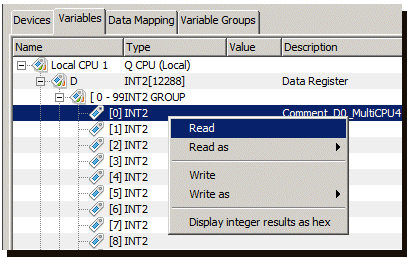
For this example, the device variable D[0] with an INT2 data type is read. The current value of the device variable is displayed in the Value column. If the variable has comments associate with it, they are displayed in the comment column.
Alternatively, instead of displaying the pop-up menu and selecting Read, you can:
- Double click the device variable row to read the device variable's value
- Use the Read button at the bottom of the panel
Reading multiple device variables at one time
Multiple device variable rows can be selected and read
at one time by using the pop-up menu Read
option or the Read button.
If non readable rows are selected, such as a Device row or
a structure row, the rows are ignored and only the readable
rows are actually read.
Reading device variables as a different data type
The device and its variables shown in the example support the reading of device variables as a different data type. All devices do not support this function.
In the pop-up menu, you can also select Read
as to have the supported alternative data types
displayed. In this example the data types are: INT2, INT4,
FLOAT4 and STRING.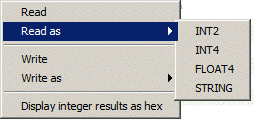
When you use the Read as function, the
device driver reads the values of variables starting at the
current variable address for the length implied by the
selected data type.
For example, using Read as INT4 on device
variable D[0] would read 2 2-byte WORDS and display the
value as a 4-byte INT4. The variables read would be D[0]
and D[1], each of which is a 2-byte INT2.
Understanding of the device's variable types (registers, tags, coils, inputs, and outputs are some examples of device specific terminology), the device's variables data types, and the device's variable addressing concepts is imperative when using the Read as and Write as functions of the Workbench.
Displaying integer results as hex
The Variables tab supports displaying
integer values as hex values. This option is toggled on or
off and applies to all devices variables' values.
When writing values, the value must be entered in decimal
(base 10) format.