The MongoDB Count transport map allows you to count the number of JSON documents in a MongoDB database collection. You have the ability to do the following:
- Specify a collection to work with
- Specify a query document that can be customized by input variables to get a count of matching documents.
Assumptions
The following is assumed:
- You are familiar with JSON
- You are familiar with specifying a FreeForm transport map as described in Creating a payload of freeform text
- You are familiar with the MongoDB Count syntax
- A MongoDB transport has been created.
Procedure
To define a count transport map, access a node with the Workbench.
- Navigate to the Transport Map window and select the
New button.
- In the Transport Name parameter,
select a MongoDB transport. You can use the
Transport Type parameter to filter the
transports listed to a specific transport type.
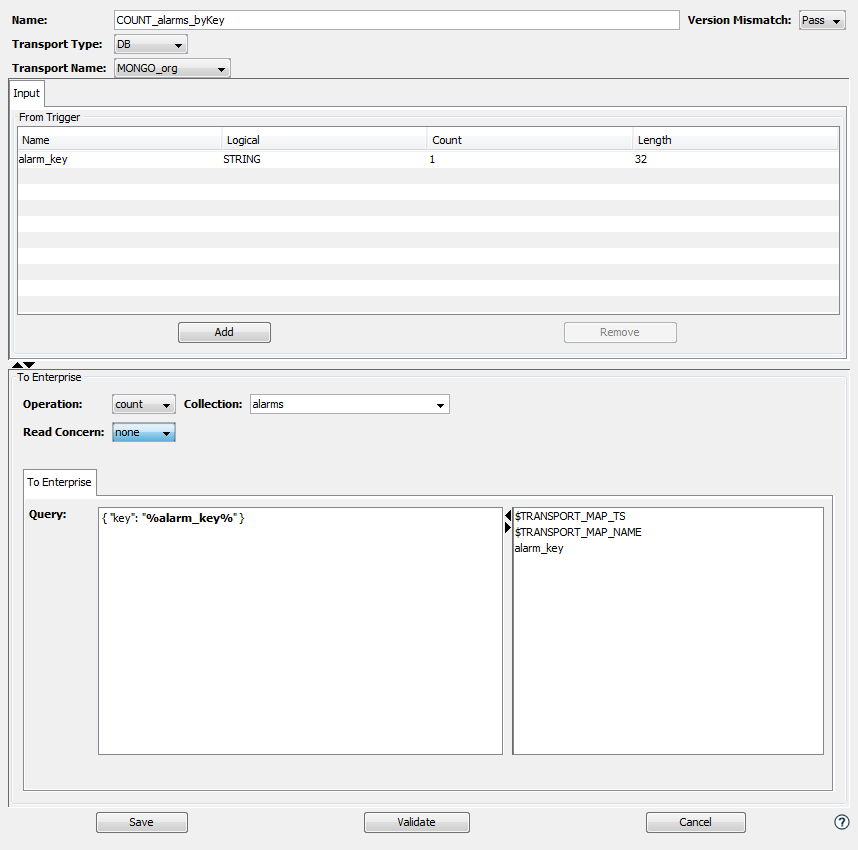
- Select the count operation from
the Operations pick list. The panel
changes as shown below.
-
Specify optional input variables that will be used in building the Query string.
-
Specify content in the To Enterprise section using the table below.
Parameter Description Collection The collection name to be used when searching for documents. You can either type the name or select a collection from the the pick list. Read Concern The read concern that will be used when counting documents in the collection. You can specify one of the following options from the pick list - none ( default )
- local
- majority
Query A free form text box where you can build a JSON document that defines the query. You can use input variables as substitution values. Refer to Creating a payload of freeform text for details on specifying a free form text with input variables. -
Define a trigger that uses the previously defined count transport map. The image shows the output tab of this action.
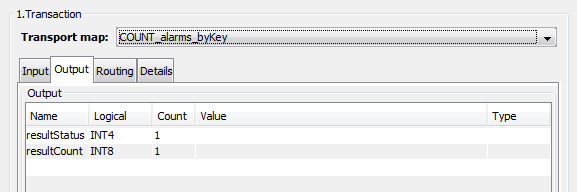
The output tab of the count Transaction action will display the following output variables. These variables are updated with the results of the execution of the count operation.
Parameter Description resultStatus The result of executing the count transaction. If successful this will be 0. resultCount The count of the number of documents that were queried.