The payload error log is an optional feature that can be used to view request and response payloads that correspond to transactions that have failed due to an application level error. The failures could be due to any of the following:
- Requests that fail because insufficient data has been supplied in the request
- The end point specified in the request is not configured to process the specific request
- The response received is not compatible with what is configured on the transport map
This feature is available on the following transport types.
- TCP
- HTTP
- SAP_MII
- WS_SOAP
Enabling the payload error log
Navigate to the Transports panel and enable the payload
error log feature by selecting the transport you want to
work with. Bring up the context menu by selecting the right
mouse button.
Select the Enable Payload Error Log
option: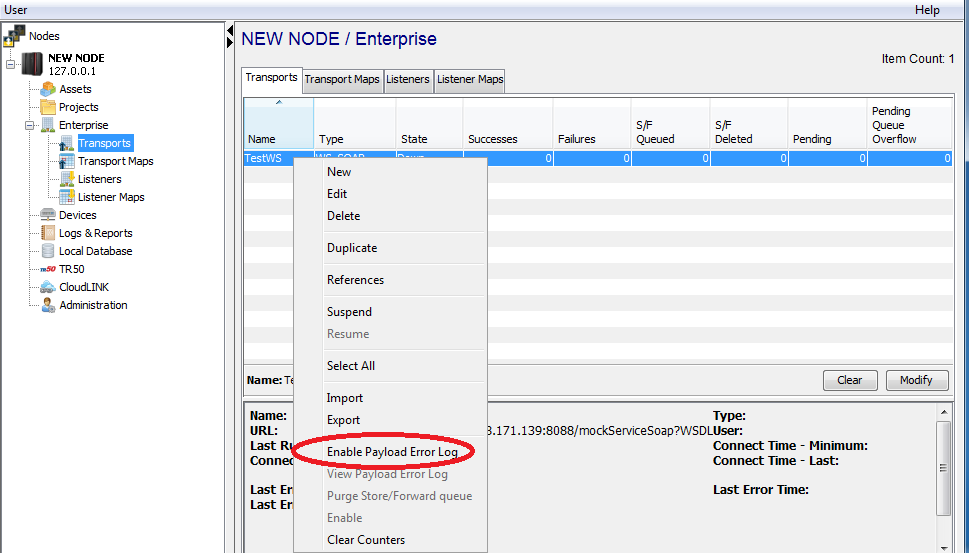
Once this feature is selected, the Enable Payload
Error Log entry displays a check mark to indicate
that this feature has been enabled. Once configured the
setting is in place until the node restarts.
The capacity of the log, which determines how many
active requests ( and corresponding response ) payloads are
stored, is determined by the runtime platform as shown in
the table below.
When an payload error log is at capacity, a new entry will
replace the oldest entry in the log.
| Enterprise Platform/Product | Maxiumum number of log entries |
|---|---|
| Enterprise Gateway for Windows/Linux/AIX | 50 |
| Mitsubish MESInterface IT
Enterprise Gateway for Siemens ERPC |
10 |
Viewing the payload error log
If a request processed by this transport fails due to an
application level error, the request and response payloads
are stored in the payload error log.
Once there are view-able error log entries, the
View Payload Error Log context menu option
is enabled:

Select the View Payload Error Log option to display the request and response payloads:

The payload error log is cleared under the following conditions:
- The Clear Counters context menu option is selected on the Transport.
- An interval of 4 hours has elapsed since the last failed request was added to the payload error log.