The Enhanced Demand Write action writes a group of device variables at that point in a trigger's execution, bypassing the internal trigger buffer used for device variables that is normally written when the trigger ends execution.
When a trigger starts it execution, all variables
referenced by the trigger's actions are read into internal
buffers. The variables' values are read from or written to
this internal buffer when the variables are referenced by
any of the trigger's actions. The internal buffer is
written to the devices when the trigger completes its
execution.
To bypass this internal buffering, the Enhanced
Demand Write action forces a write of the device
variables through the device manager and device driver to
the device.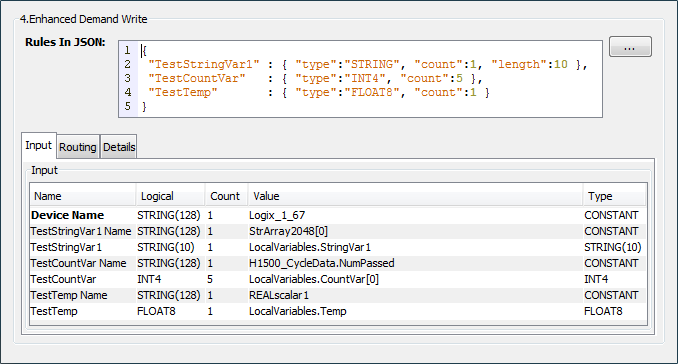
Example
{
    "TestStringVar1": {"type":"STRING", "count":1, "length": 10},
    "TestCountVar": {"type":"INT4", "count":5},
    "TestTemp": {"type":"FLOAT8", "count":1}
}
The Enhanced Demand Write action is part of the Advanced Features package. For more information on obtaining and installing the package, see Packages.
Parameter descriptions
| Parameter | Description |
|---|---|
| Rules in JSON | The description of the device
variables to write. Each variable is
specified as shown in the example
with:
|
 can be used to display a larger
input area for the JSON variable
description.
can be used to display a larger
input area for the JSON variable
description.Input tab
The Input tab has the device name parameter and two rows for each variable identified in the JSON variable description.
| Parameter | Description |
|---|---|
| Device Name | The name of the device containing the variables whose values you want to write. |
| Variables |
Each variable in the JSON variable
description will be added as two rows
on the Input tab.
|
Enhanced Demand Write considerations
When a trigger action writes to a device variable, the updated value is held in an internal buffer until the trigger completes it execution.
When a trigger starts it execution, all variables referenced by the trigger's actions are read into internal buffers. The variables' values are read from or written to this internal buffer when the variables are referenced by any of the trigger's actions. The internal buffer is written to the devices when the trigger completes its execution. This process maximizes performance of the trigger execution.
In cases where the device variables need to be written directly to the device at a certain point in the trigger's execution and not just to the internal trigger buffers, the Enhanced Demand Write action is used. These cases need to take into account the overall application logic in the triggers and in the devices to understand the dynamic interaction of all parts of the application. The Enhanced Demand Write action does take additional resources in terms of processing time (compared to for example a Set action), since the trigger engine and device driver must communicate down to the physical device and get a response. This includes the communication across the network to the device.
The data type specified for each variable must match the data type of the destination device variable. If it does not match, that variable will not be successfully written.
The action will fail if there is a problem with the device specified (not defined or not started). The action will succeed if there are individual problems with the variables specified. The variables that had individual problems (variable not defined, data type mismatch, data overflow, data cast problem) will not update the corresponding device variable. The variables that did not have a problem will update the corresponding device variables.
 Related Topics