The runtime can perform data conversions as part of the
Set action. Because the system is designed
to support devices from multiple vendors, and not all
vendors support the same data types, there may be cases
where the source data type and the destination data type
are not compatible.
For example, you can copy data from an INT2 to an INT4. In
this case, the 2 byte integer represented by the INT2 will
be expanded to an INT4, or 4 bytes. Typically, this is
permitted.
The range of values represented by an INT2 is -32768 to
+32767. These values can also be represented within an INT4
as well.
However, you should be careful when moving data to other
data types where possible conversion might distort the
meaning of the data.
Example 1 (INT2 to a static string)
The example will copy 2 bytes of data from D[20] in the PLC to a static string variable called StaticE.
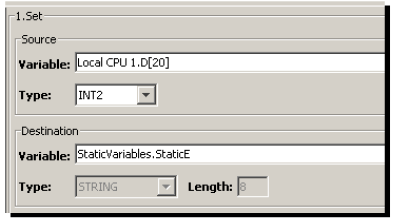
It is possible that the data in D[20] does not represent a valid pair of ASCII characters. Therefore, if the data is hexadecimal x00FF, which is numerically 255, this cannot be interpreted as valid ASCII characters. If the data is hexadecimal x4142, which is numerically 16,706, this could be interpreted as the ASCII string AB.
Example 2 (INT4 to a FLOAT4)
The example will copy an INT4 (4 bytes) from D[20] to StaticC a FLOAT4.
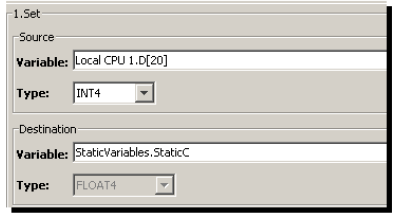
The example might not to be valid since FLOAT4 data is
represented internally as an exponent and mantissa, both of
which are represented in binary form within the 4
bytes.
As a general rule, when moving data, try to move data
between similar data types to avoid possible errors.