A Logging event trigger executes when a message log entry is written to the exceptions log or audit log.
Defining a logging event trigger
To define a logging event trigger, follow these steps:
- From the Workbench left pane, expand the node where
you want to define the logging event trigger.
- Select the Project icon to display
the Projects window, right-click a
specific project tab to display its pop-up menu, and
then select New.
You also can select the New button at the bottom of the Projects window when a specific project tab has already been selected. - The new Trigger window
appears.
Name the trigger. The trigger name can be up to 64 characters and include letters, numbers, and the underscore character. Spaces are allowed. - From the Event tab, select the
Trigger Event Type down-arrow, expand
the Internal category, and then select
Logging Event.
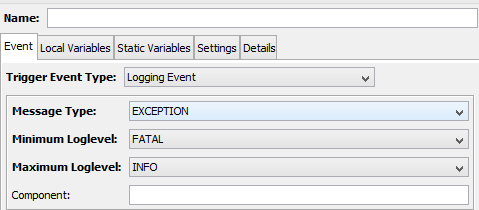
The Event tab becomes active with parameters that accommodate the logging event.
| Parameter | Description |
|---|---|
| Message Type | Selects the type of log message
entry to cause the trigger event. The
options are: EXCEPTION - to specify the Exceptions log. AUDIT - to specify the Audit log |
| Minimum Loglevel | When the message Type is EXCEPTION
only, selects the minimum log level to
cause the trigger event. The log levels are in order from lowest number (and most severe) to highest number (and least severe): FATAL, ERROR, WARN, INFO. |
| Maximum Loglevel | When the message Type is EXCEPTION
only, selects the maximum log level to
cause the trigger event. The log levels are in order from lowest number (and most severe) to highest number (and least severe): FATAL, ERROR, WARN, INFO. |
| Component | Optional. A case sensitive field to
filter on a single component value to
cause this logging event trigger to
execute. For example, specifying "Transaction Engine" (without the quotes) will cause this trigger to execute if the log message has Transaction Engine for the component. The component value can be a user defined value (from a Log Message action) or a system defined value from one of the system components. Leaving the component parameter blank will cause the logging event trigger to execute for all log message component values. |
Logging event type trigger event variables
The input event variables available to a logging event trigger when the message type is EXCEPTION are:
| Event variable | Data type | Description |
|---|---|---|
| Code | INT4 | The error code used in the log message. |
| Component | STRING | The component used in the log message. |
| Level | STRING | The log level used in the log message. |
| Message | STRING | The log message text used in the log message. |
| Timestamp | TIMESTAMP | The date and time that the log message was written to the exceptions log. |
The input event variables available to a logging event trigger when the message type is AUDIT are:
| Event variable | Data type | Description |
|---|---|---|
| Code | INT4 | The error code used in the log message. |
| Component | STRING | The component used in the log message. |
| Message | STRING | The log message text used in the log message. |
| Timestamp | TIMESTAMP | The date and time that the log message was written to the audit log. |
| User | STRING | The user associate with the log message. This can be the user who used the Workbench to select a function, or it could be one of the system components. |