The following section lists common tasks, problems, and their resolutions for troubleshooting the OPC-UA Client driver.

Both the variable watch window and data triggers use UA subscriptions to monitor data changes. Each trigger and each variable in the watch window requires its own subscription. If the OPC-UA server limits the number of available subscriptions, it may result in read errors. Configure the OPC-UA server to allow more subscriptions.
OPC-UA servers support dynamic array sizes while deviceWISE does not. Modifying the array size after starting the OPC-UA client will cause read and write errors.
Not all OPC-UA servers support reading and writing to subsets of arrays. For these servers, reads and writes must be performed on the entire array.
Device disables with auto subscription fail error
When the Subscribe To Tags parameter = Yes, the OPC-UA Client driver attempts to auto subscribe all enumerated variables using a rate value from the Subscription Rate(ms) parameter.
If the auto subscription fails continuously, check the following:
- Check the OPC-UA Server supports subscription.
- Check the OPC-UA Server supports the subscription with the selected Subscription Rate.
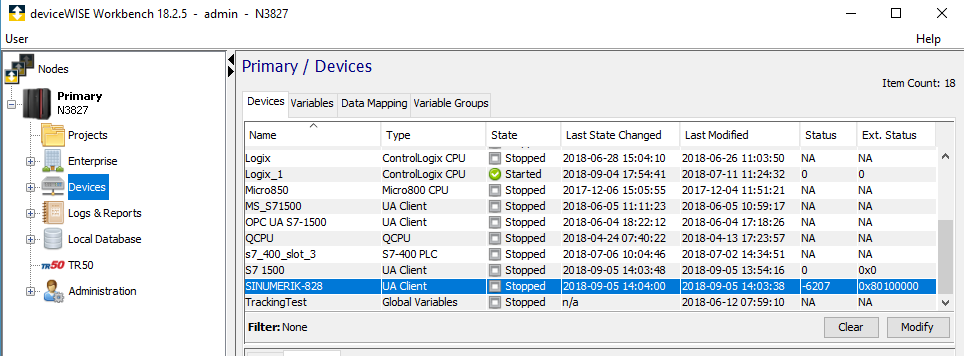
Device Start fails with Ext. Status value of 0x80100000
The OPC-UA error code value of 0x80100000 is returned by the OPC-UA Server indicating that a request sent by the client contains too many operations. A scenario where this might occur is when the OPC-UA Client is starting. The OPC-UA Client by default has a Max. Nodes per Browse value of 10,000. Some OPC-UA Servers are not able to handle requests this large, in which case they will return the 0x80100000 error code. To correct this error set the Max. Nodes per Browse to a lower value. As an example, internal testing for an OPC-UA Client connecting to the OPC-UA Server on a Siemens Sinumerik 828D required a Max. Nodes per Browse value of 20. Attempting to connect the client with Max. Nodes per Browse values larger than 20 failed, when the OPC-UA server returned the 0x80100000 error code.
Unable to start more than 25 devices
Maximum devices supported is limited to 25 due to the limitation in the driver. The 26th device will be disabled on start with the Connect failed error.
Error codes
| Ext. Error Code | Description |
|---|---|
| -33650 (0xFFFF7C8E) | Certificate Untrusted. The certificate of the server is not trusted by the client. Move the certificate from /staging/uaclient/pki/rejected to /staging/uaclient/pki/trusted/certs |
| -33651 (0xFFFF7C8D) | Certifcate security checks failed. The server does not trust the client`s certificate. On your OPC-UA server trust the Telit OPC-UA Client certificate. |
| -33662 (0xFFFF7C82) | Server does not support endpoint settings. The OPC-UA server specified does not support your requested connection settings. Ensure that the server supports your chosen Security Policy and Authentication Setting |
|
-33663 (0xFFFF7C81) |
Private Key given is invalid. This error occurs due to the following reasons:
Ensure that all the above issues are fixed before attempting connection. |
| -33654 (0xFFFF7C8A) | Certificate hostname invalid. The host name in the server`s certificate does not match the hostname used to connect. Ensure that your Endpoint url is configured correctly using the hostnames/ip addresses listed in the Server`s certificate. |
Memory usage increases using multiple OPC UA Client devices
OPC UA Client devices require significant memory usage for starting and browsing for tags. When using multiple devices, this memory usage is multiplied and the memory is not released by the 3rd party OPC UA Client SDK until deviceWISE is restarted. If memory usage is limited on the deviceWISE node, be sure to properly schedule restarts of deviceWISE when multiple OPC UA Client devices are used concurrently.
Data Event Trigger using an OPC UA Tag disables immediately
Data Event Triggers that use OPC UA Tags utilize the OPC UA Subscription feature. This feature is implemented by the OPC UA Server that the OPC UA Client is connected. If the Priority setting selected when defining the Data Event Trigger is less than the subscription interval supported by the OPC UA Server, the Trigger will disable. Selecting a higher Priority setting in the Data Event Trigger will correct this problem, allowing the Trigger to Start.