The Omron CIP Listener is a unique device type in that it does not represent a physical Omron PLC. Instead, this “Listener” device, when started, activates a process on the node that will listen for unsolicited Common Industrial Protocol (CIP) protocol messages sent from Omron NJ series controllers. The ladder logic running on the Omron NJ controllers must be configured to route the CIP message to the node.
To define a device that represents an Omron CIP Listener, follow these steps:
- From the Workbench left pane, expand the node where
you want to define the device.
- Select the Devices icon.
The Devices window appears as the right pane.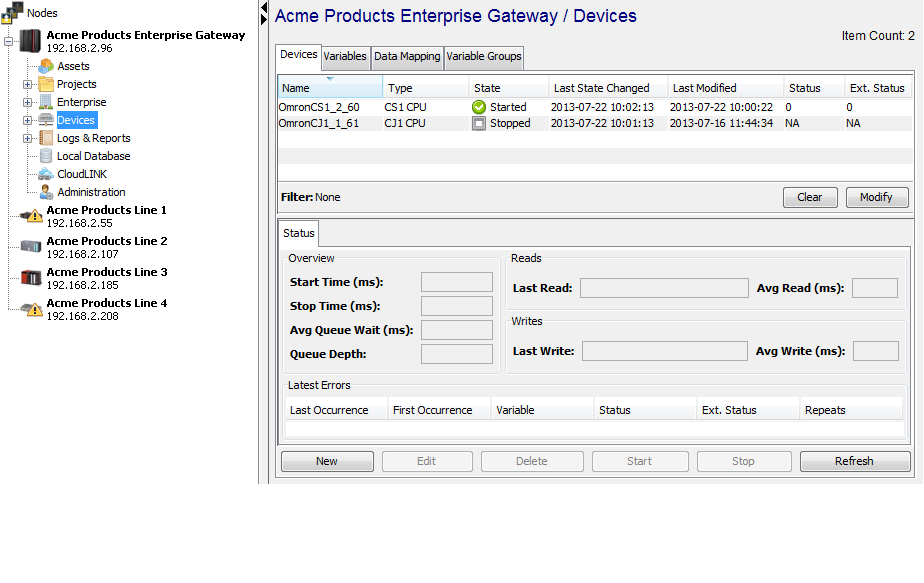
The Devices window provides a table format that lists the previously defined devices. - To define a new device, select New
at the bottom of the pane.
The Device window appears. The available device types are determined by the device support that is installed in the node. - Use the Type down-arrow, to select
Omron CIP Listener under the
Omron group.
The Device window changes to accommodate the selected device type.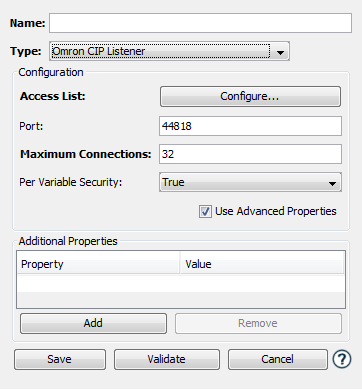
-
To define a device that represents an Omron CIP Listener, set this new device’s parameters as follows:
Parameter Description Name Enter a name for the Omron CIP Listener device. Type Select Omron CIP Listener. Access List The access list defines what IP addresses are allowed to connect and send unsolicited messages to this node. This is done by either granting or denying access privileges to specific IP addresses or to entire IP subnets. Care must be taken when defining entries in the list to ensure that the listener works properly and receives messages from intended PLCs. Port Enter the port number used by the device. The default value is 44818, which is the default port value defined in the CIP protocol. It is highly unlikely that this value will need to be changed. Be aware that Omron software that is used to communicate to NJ series PLC's also uses this port. The Omron CIP Listener device cannot start if this port is in use by another software product. Maximum Connections This is the maximum number of PLC connections that the listener is allowed to service at the same time. Care should be taken to create a reasonable limit based on the number of PLCs that will be sending CIP protocol messages to the node. The default value is 32. Per Variable Security Select False to disable the allocation of additional memory to track User to Variable access for all Variables in this Device. Select True to enable this feature if required. For more information, see Setting up Read Write per device variable. - Select Validate to have the
parameters validated. If there is a problem, an error
code will be displayed.
- Select Save to save the device
definition. The device will appear in the Devices
window list of devices.
- You can now control the device
(Start, Stop), access
the device’s variables by using the
Variables window, and build solutions
that use the device’s resources.