The MongoDB transport definition panel allows you to specify configuration information in order to access a MongoDB server. It also allows you to specify common runtime behavior shared by many transports such as:
- Connection and Transaction timeouts
- Store and Forward
- Mapping Logs
Procedure
Follow these steps:
- Using the Workbench access a node and navigate to
the transport panel and select the New
button to bring up a transport definition panel.
- In the Name parameter, type a
unique name for the transport
- Use the Type drop down and select
DB
- Access the DB Type pick list and select MongoDB.
The panel will change to allow the specification of
MongoDB access parameters as show below
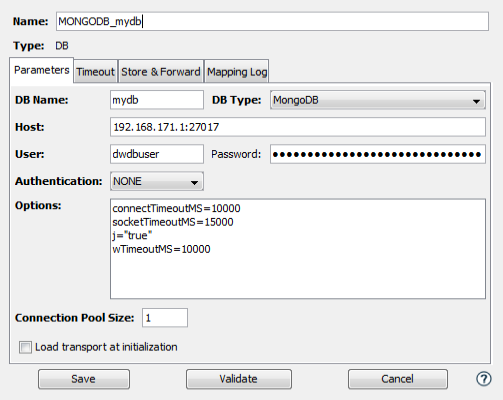
Parameters tab
| Parameter | Description |
|---|---|
| DB Name | Enter the name of the database. |
| Host | Specify the comma separated list of
hostnames and ports of the hosts in the
database cluster.
For example: 192.168.171.1:27017,192.168.172.121:27017,192.168.171.221:27017 |
| User | The userid used to access the database. |
| Password | The associated password. |
| Authentication | Leave this as NONE. |
| Options | Enter connection configuration
parameters in a name=value format with
one option per line.
Each entry will be concatenated with "&" when building the URL string used to access the database. Refer to https://docs.mongodb.com/manual/reference/connection-string/#connections-connection-options for specific option information. |
| Connection Pool Size | Specify a connection pool size to be used when connecting to the database. |
| Load Transport at initialization | Check this box to specify that the transport connects to the database when node starts. |
Timeout tab
| Parameter | Description |
|---|---|
| Connection (seconds) | The value specified in this field is the amount of time (in seconds) the transport will wait on the database server to establish a connection. This value will be used to specify the connectTimeoutMS keyword in the Options parameter of the transport definition panel (converted to milliseconds). It will not override the Options parameter if it has been specified. |
| Execution (seconds) | The value specified in this field determines how long (in seconds) the transport will wait for a database access operation to complete. This value will be used to specify the socketTimeoutMS keyword in the Options parameter of the transport definition panel (converted to milliseconds). It will not override the Options parameter if it has been specified. |
Store & Forward tab
The MongoDB transport supports the storing and
forwarding of Transactions (requests) when they cannot be
successfully processed due to the MongoDB server being
unavailable.
In such cases the transport maps that use the Insert,
Update and Delete operations will be stored when the
connection to the MongoDB server fails. The Count and Find
operations will not be stored.
For information on the Store & Forward tab, see Store & Forward tab.
Mapping Log tab
The MongoDB transport supports the transaction mapping log feature. Transport map logging enables the content of every outbound request and any inbound response for the transport to be recorded in a mapping log.
For information on the Mapping Logs tab, see Mapping Log tab.
Testing and saving the MongoDB transport
- To test the connection,
select Validate. The validation
consists of establishing a connecting to the MongoDB
server and disconnecting.
- If no errors are received, select Save. The transport definition is saved to the node.
The name of the new transport is added to the Transports tab and will be available for use by a transport map.