Once you have defined your devices, you can use the Workbench to access the variables that reside in those devices.
- From the Workbench left pane, select the
Variables icon. The
Variables window appears as the right
pane.
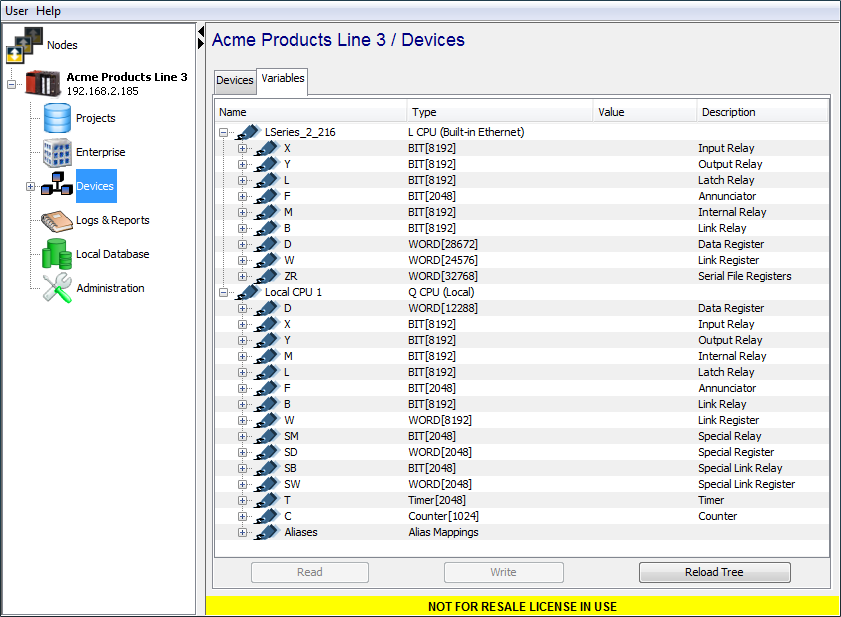
The Variables window provides a tree format that lists the started devices in the node. The devices must be in the Started state to be included in the Variables window.
Each device can be expanded to show the variables that reside in that device. - You can expand or collapse the tree format to zoom
in or out on a device’s variables.
When you get to an individual data element, you have access to the Read and Write functions to read a device’s data element or write a device’s data element.
For information on data types and data conversion supported by the Mitsubishi driver, see Mitsubishi supported access. - You must ensure that the appropriate levels of
security access privileges are in place to restrict the
access to data elements to those personnel who have the
proper knowledge and understanding when reading or
writing device data elements. For more information, see
System Administration > Security.
Some of the data elements may also be configured to be read only within the device using the device’s programming tools.
Label Support
GxWorks defined Labels can be displayed on the Variables
windows. For example:
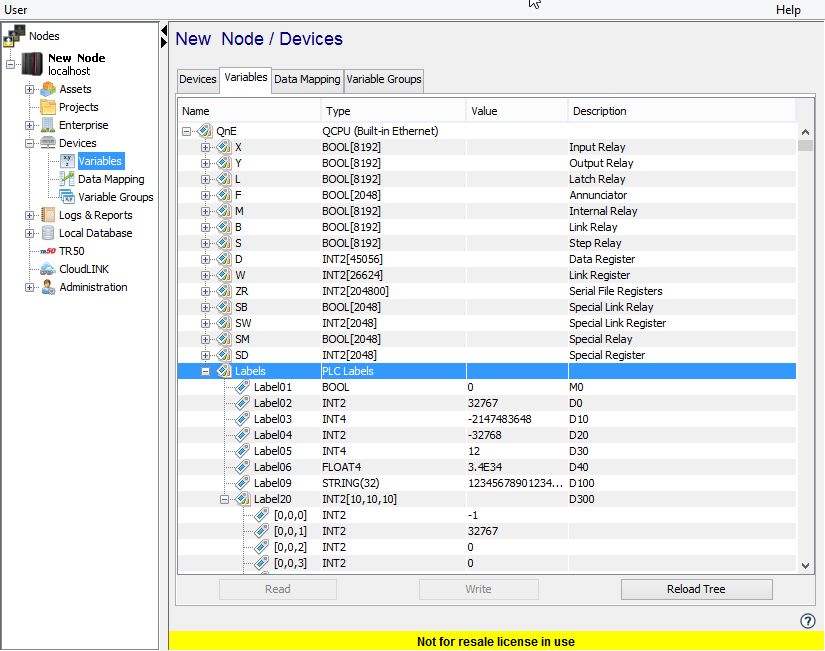
This example shows a device that is utilizing the Label Definition feature as described on the Using the Workbench to define a Mitsubishi device page.
- Labels, which were defined using the GxWorks software and exported to a .csv file, are included in the list of variables defined on the PLC.
- The Labels are all grouped under a variable named Labels. The variables shown were defined with Label names such as Label01, Label02, etc. These are just examples as the actual Labels can be named with any value that is allowed by the GxWorks software. A data type is assigned to the Label in the GxWorks software.
- The Mitsubishi driver supports a subset of these data types. This subset is defined in the Mitsubishi supported access page. Likewise, the driver supports a subset of device regions found on a Mitsubishi PLC.
- The supported regions are also defined in the Mitsubishi supported access page. The data region and specific offset defined for the Label are shown in the Description column of Variables window.