A TR50 Connection State Change event trigger executes when the TR50 connection state changes.
Defining a TR50 Connection State Change event trigger
To define a TR50 Connection State Change event trigger, follow these steps:
- From the Workbench left pane, expand the node where
you want to define the TR50 Connection State Change
event trigger.
- Select the Project icon to display
the Projects window, right-click a
specific project tab to display its pop-up menu, and
then select New.
You also can select the New button at the bottom of the Projects window when a specific project tab has already been selected. - The new Trigger window
appears.
Name the trigger. The trigger name can be up to 64 characters and include letters, numbers, and the underscore character. Spaces are allowed. - From the Event tab, select the
Trigger Event Type down-arrow, expand
the TR50 category, and then select
TR50 Connection State Change.
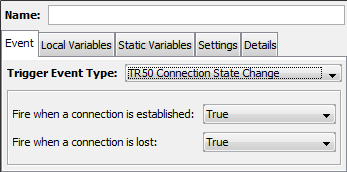
The Event tab becomes active with parameters that accommodate the TR50 Connection State Change event.
| Parameter | Description |
|---|---|
| Fire when a connection is established | The options are True or False. If True is selected, the trigger will execute when the TR50 connection Status changes to Started. |
| Fire when a connection is lost | The options are True or False. If True is selected, the trigger will execute when the TR50 connection Status changes to any value other than Started. |
Connection state change event type trigger event variables
The input event variables available to a TR50 Connection State Change event trigger are:
| Event variable | Data type | Description |
|---|---|---|
| Connection Name | STRING | The TR50 connection which caused the trigger to execute (the TR50 connection whose state changed). |
| Is Connected | BOOL | Will be true (1) if the TR50 connection Status is Connected. |
| Is Stopped | BOOL | Will be true (1) if the TR50 connection State is Stopped. |
| State | STRING | The current (new) State of the TR50 connection. The value will be Started or Stopped. |