This trigger action will accept a binary encoded string and decode it to an object. Compatible with the deviceWISE Decode Binary Buffer trigger action.
Action
To access the binary.decode trigger action:
- In the Adding trigger screen, under Binary click and drag the binary.decode to the canvas.

Canvas
When dragged onto the canvas, the appearance of the action is a rectangle with two routing points.

The left routing point (red) is the failure route. This route will be taken if there is an error during execution.
The right routing point (green) is the success route. This route will be taken if action executes successfully.
Form
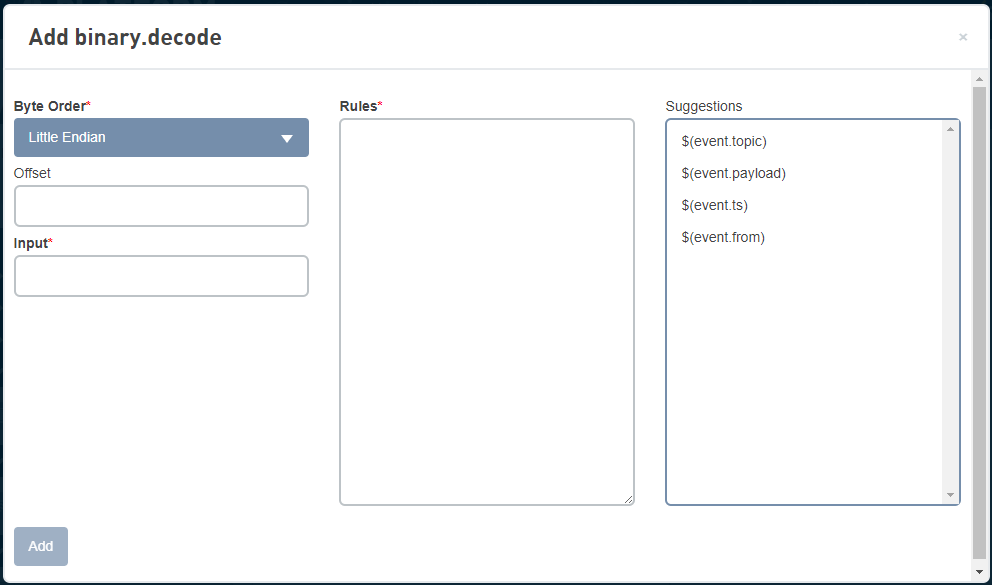
Parameters
| Name | Type | Required | Description |
|---|---|---|---|
| Byte Order | String | Yes |
The options are:
|
| Offset | Integer | The number of bytes to skip before processing the value of Input. | |
| Input | String | Yes | The binary input to be processed. This field may contain the output of a based64.decode or hex.decode action, or may be a base64 encoded string, |
| Rules | Object | Yes | A JSON object containing Rule objects. The keys in the object will contain the results of applying the rules to the input. |
Rule Object Parameters
| Name | Required | Description |
|---|---|---|
| offset | Yes | The object that is the result of decoding the input. |
| type | Yes | The type of the source variable in the binary buffer. The supported types are: BOOL, INT1, INT2, INT3, INT4, INT8, UINT1, UINT2, UINT3, UINT4, UINT8, FLOAT4, FLOAT8, STRING, and BINARY. |
| count | Yes | The number of variable elements. Specify a 1 for a single (scalar) element or a value greater than 1 for an array. |
| length | The length of data. This is only specified if the type is STRING or BINARY. | |
| interval | The distance between the starting of each element of an array. This field is only used when an array is specified. For example: if the offset is 30, the interval is 6, and the count is 4, the data will be read from the binary buffer at offsets 30, 36, 42, and 48 regardless of the data type. If the interval is not specified, or specified as a zero, the distance will be the length of the element. Each element will start immediately after the end of the previous element. | |
| swap | A boolean value to indicate whether the data byte/word order should be swapped before writing into the destination variable. | |
| bitOffset |
The specific bit from each offset starting from the current offset up to the total number of offsets ("count"). Gets only 1 bit in each offset. The next offset is then processed depending on the count (in bytes).
|
|
| bitCount | The number of bits processed from the bitOffset. |
Action variables
| Name | Type | Description |
|---|---|---|
| Value | Object | The object that is the result of decoding the input. |
decode.binary rules example
This example shows the JSON description of the variables and the placement of the data as it is read from the source binary buffer.
"First" : {"offset":8, "type":"FLOAT4", "count":1 },
"Second" : {"offset": 12, "type":"STRING", "count":2, "length":4 },
"Third" : {"offset":30, "type":"INT4", "count":4, "interval":6 }
}
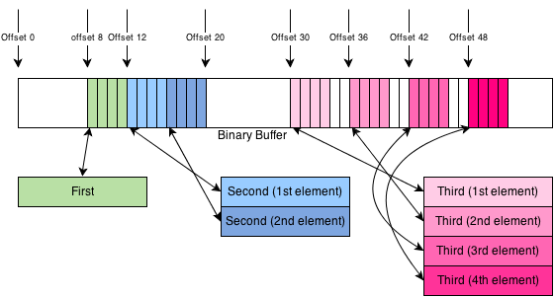
The result of applying these rules will be an object with three keys: First, Second, and Third.
-
First will contain a single float number.
-
Second will contain an array with two string elements.
-
Third will contain an array with four integer elements.