To define an OPC-UA Server device, do the following:
- Install the runtime software and
Workbench. For more information on installing the runtime software on your operating system and Installation of Workbench, see the appropriate Installing
product software section for installation
information.
- Ensure the node has the OPC UA Server driver package
installed and the required license, to enable the OPC UA Server driver functions.
- For information on adding the OPC UA Server driver package, see System Administration > Packages.
- For information on installing a
license, see System Administration >
Licenses.
After the OPC UA Server package and its associated licenses are installed, the node will re-start. An OPC UA Server tab will appear in the Administration panel.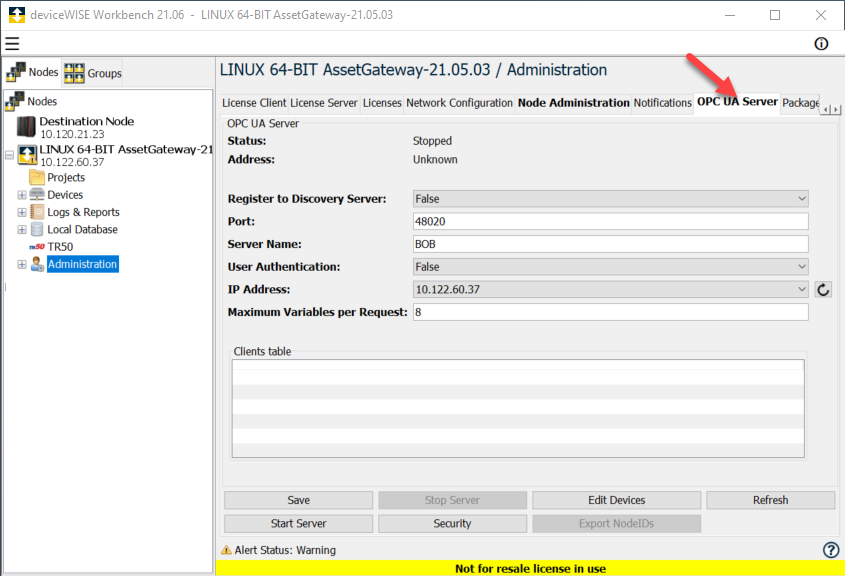
- The next step is to configure the OPC UA Server to make it available for the OPC UA Clients. For more information on Configuring the OPC UA Server, see Configuring the OPC UA Server.
The OPC UA Server extension will allow variables contained in deviceWISE devices to be exposed to OPC UA Clients as OPC Tags. Any of the devices defined on the node can have their variables exposed as OPC Tags. This includes logical devices, such as Global Variables devices, Property File Reader devices, and physical devices such as the Mitsubishi, Modbus, Omron, Rockwell and Siemens devices. This task is described in the following sections: